 Anno Domini 2003
Anno Domini 2003
Latest Update of AD 2003, v1.15
Full instructions on how to apply the upgrade is detailed below. Please do read these instructions very carefully before you begin and print this web page to ensure you can follow the installation procedure correctly. Before download, you must agree and abide to the Anno Domini 2003 terms and conditions noted in the Distribution and End User Agreement detailed below.
If you are suffering from a poor Internet connection, you can alternatively download the upgrade in the form of two floppy disk images by clicking on the two hyperlinks below. You must download both images before attempting the upgrade.

Upgrade Installation Instructions
Step 1 ...
Before you can proceed to upgrade to the latest version of Anno Domini, you must have a previous version of Anno Domini 2003 already installed. You can verify which version of Anno Domini is installed on your system by clicking the About tab of Anno Domini and looking at the bottom right hand corner for the version and build number.
If it is found that you are running Anno Domini 2001 or that you are running Anno Domini 2002 with a version number prior to 1.06, please download and install Anno Domini 2002 version 1.06 (Build 2). Click here to download it now.
If you are running v1.06 (Build 2) and wish to upgrade to Anno Domini 2003, please click here to update to v1.08, Build 1 of Anno Domini 2003. Once v1.08 is installed, you may use the following update to download the very latest version.
Step 2 ...
Ensure Anno Domini is not running by right clicking your mouse on the Anno Domini icon in the taskbar and selecting Exit from the menu.
Step 3 ...
Run either the AD314UP.EXE or AD314UP1.EXE program that you downloaded from the Anno Domini web-site to begin the installation of the upgrade and a ZipMagic Installation dialog will then appear as follows:
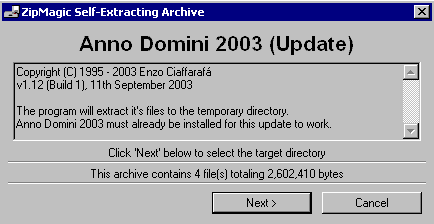
Click the "Next>" button to proceed.
Step 4 ...
The following dialog now appears asking you where you want to store the temporary files:
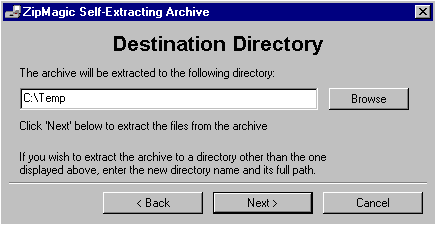
The installer defaults to the path C:\Temp - if you want to you can click on the “Browse” button to change where these temporary files will be installed to a place of your choosing.
N.B. DON'T SELECT THE PATH OF YOUR EXISTING COPY OF ANNO DOMINI, E.G. C:\ANNO DOMINI 2003;
Click the “Next>” button and the installation files will be unzipped to your temporary directory.
Step 5 ...
Extraction of the compressed files will be confirmed in the following dialog that now appears:
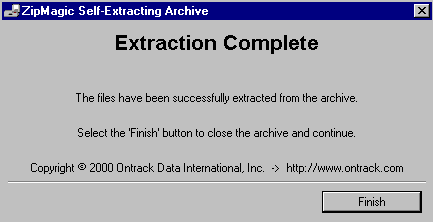
Click the “Finish” button to proceed.
Step 6 ...
The Anno Domini 2003 Installer will appear showing four possible options as below:
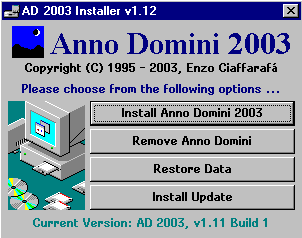
Click on the “Install Update” button. (NOT THE "INSTALL ANNO DOMINI 2003" BUTTON !)
Step 7 ...
You are now asked if you wish to proceed with the upgrade. Click the “OK” button to proceed;
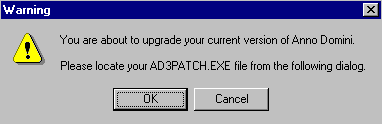
Step 8 ...
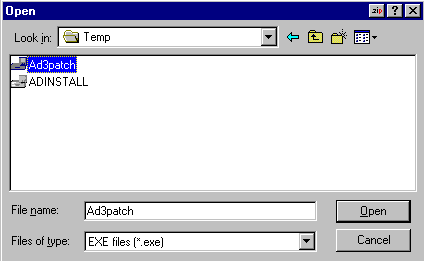
Click on the AD3PATCH.EXE filename from your temporary directory and click the “Open” button;
Step 9 ...
Detailed information about the upgrade is show as below. Click the “OK” button to proceed.
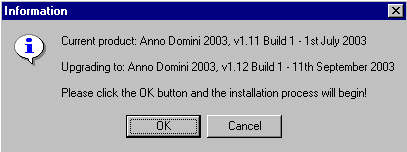
Step 10 ...
The update is performed while the message “Upgrading Anno Domini. Please wait ...” is shown.
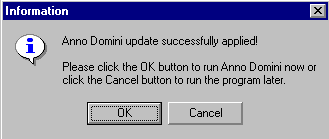
When the update is complete, click the "OK" button to run the latest version of Anno Domini now.
Step 11 ...
Anno Domini 2003 will run and display the following message:
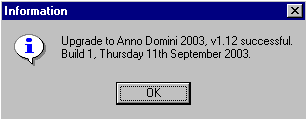
Click the “OK” button and Anno Domini 2003 will appear and the upgrade is completed.
The installer creates three shortcuts (AD2003, ADINSTALL and README.DOC) on your desktop and in the Programs section of Start menu. Also, an icon will reside in your Tray area of the Windows Taskbar indicating that AD 2003 is currently running. Simply double-click that icon at any time to access the programs features. Should you exit the program and wish to run the program again in the same session, double-click the AD2003 icon that was created on your desktop.
If for any reason you do not reach step 11 of the installation process, please note down at what point the installation process stops and note any warning message that is displayed. Then please report the error via an e-mail to support@anno-domini.net for guidance on how to resolve the problem.

Anno Domini 2002 Update
To install the patch, run the PATCH.EXE program and follow the on-screen instructions. Click the "Next>" button and you will be asked for a temporary location to store the contents of the patch (usually C:\Temp). Click the "Next>" button again to copy the files to your chosen location. Once the files have been copied, the Anno Domini installer will automatically appear.
Click on the "Install Update" button, search for the file called AD2PATCH.EXE which can be found in the temporary location you created earlier, e.g. C:\Temp, and click on the "Open" button. You will then be prompted to check that the size of the patch matches that noted on the website. Providing the file sizes match (the exact file size for the AD2PATCH.EXE file should be 1,729,758 bytes), click on the "OK" button and your system will be rebooted and the installation process will begin.
Once rebooted, you will be prompted to store the unzipped files to your existing Anno Domini directory (usually C:\Anno Domini 2001). Please ensure that you install the patch to the same directory where you first installed Anno Domini. Click on the "Next>" button and once the files have copied, a dialog will appear confirming the successful upgrade to Anno Domini 2002. Click the "OK" button and you will then be prompted to update your Event Schemes and On This Day database.
The trial version of Anno Domini 2003 may be used for evaluation purposes at the user's own risk for a period of 28 days from the date of installation. At the end of the trial period, the user must either register their copy to continue using the software, or remove it from their PC system.
The trial version may be freely distributed in unregistered form, provided the distribution package is not modified in any way. No person or company may charge a fee for the distribution of Anno Domini 2003 without the prior written consent of the copyright holder.
To the maximum extent permitted by applicable law, the Anno Domini 2003 software and documentation is provided "as is" and the copyright holder disclaims all other warranties and conditions, either expressed or implied, including, but not limited to, implied warranties of merchantability, fitness for a particular purpose, conformance with description, title and non-infringement of third party rights.
To the maximum extent permitted by applicable law, in no event shall the copyright holder be liable for any indirect, incidental, consequential, special or exemplary damages or lost profits whatsoever (including, without limitation, damages for loss of business profits, business interruption, loss of business information, or any other pecuniary loss) arising out of the use or inability to use the software product, even if the copyright holder has been advised of the possibility of such damages. In any case, the copyright holder's cumulative and entire liability to you or any other party for any loss or damages resulting from any claims, demands or actions arising out of or relating to this agreement shall not exceed the purchase price paid for this license.
