 Anno Domini 2004
Anno Domini 2004
AD 2004 Plus! Overview
Anno Domini 2004 Plus! Pack is an optional add-on to Anno Domini 2004 Standard that gives the program a whole new look and feel with exclusive features and add-ons making the most of the feature set of Anno Domini. Please view a detailed summary of the special benefits of this upgrade below. Click here to purchase.

Julian Calendar
With the Plus! pack, you can now view calendars prior to the Gregorian Calendar change. The USA and United kingdom changed to the Gregorian Calendar system on the 14th September 1752 whereas Europe changed to the Gregorian Calendar system much earlier on the 15th October 1582. You can easily switch between the two calendar systems and view any calendar from 1 AD to 1752 AD. Examples of the changeover for the US and Europe are shown below:

The Julian Calendar can be accessed from the main Calendar window or the Mini-View via the button showing the roman numeral. The button acts as a toggle - when depressed the Julian Calendar is shown, when not depressed, the Gregorian calendar is shown. The month and year of the calendar can be altered by pressing the “+M”, “+Y”, “-M” and “-Y” buttons as in the Mini-View. You can also select any given year by left-clicking the mouse on the year and entering the year directly. The month can be selected by left-clicking the mouse on the month or using the month-picker as in the normal calendar view. You can select any of the dates in the calendar to view the times of sunrise/transit/sunset and moonrise/transit/moonset for that given date at your chosen home location on Earth with a left mouse click. Clicking the printer icon allows you to print a 12 month calendar report for any year from 1 AD to 1752 AD.
Desktop Clock
The Desktop Clock provides a handy reminder of the current time on your Windows desktop even when the main Anno Domini window is not visible. There is a choice of four different clock views depending on the size chosen as shown below:




The style and position of the clock can be chosen from the main clock control panel which allows you change the font used and it's size and also set the foreground and background colour of the clock. You can also position the clock on your Windows desktop in one of 6 pre-defined positions or choose your own specific location.
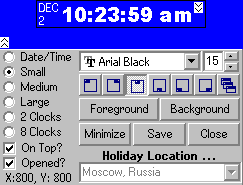
By selecting either the 2 Clocks or 8 Clocks option, you can view the current times of either 2 or 8 chosen locations from anywhere in the world in real-time on your desktop. The clock control panel allows you to select one location as your holiday location for comparison. Below shows and example of Los Angeles as your home location and Moscow as your holiday location.

With the 8 Clocks option you can view the current time for your chosen home location and the remaining 7 locations which you have chosen from the Location tab. Your home location is shown in grey and each clock also shows the current twilight status, i.e. if the box is white it is daytime at that location, if it is navy it is morning twilight, red for evening twilight and black for night time.

Options in the control panel allow you to automatically open the desktop clocks each time Anno Domini is run and also ensure it always appears above any other open desktop window.
Save/Restore Desktop

The “Save Desktop” button in the Help tab of Anno Domini allows you to record the exact position of your desktop icons for each screen resolution your graphics card is capable of displaying. This allows you to restore your desktop icons to their correct positions after a screen resolution change by simply clicking the “Restore Desktop” button. Anno Domini supports screen resolutions from 640x480 right up to 1600x1200. Each screen resolution can have an individual scheme of icon positions which are automatically stored each time the “Save Desktop” button is pressed.
Lunar and Solar Eclipses

Anno Domini now displays the dates and times of when the next partial/total solar or lunar eclipse occurs with an accuracy of plus or minus two minutes in the Astronomy tab. A left mouse click on either displayed time will connect you via the Internet to the NASA Eclipse web-site which gives you very detailed information concerning the eclipse including the best position on Earth for viewing.
Real-Time Astronomy
When the “Real-Time Astronomy” setting is on in the Preferences tab, the main status area of the Calendar tab will show the current Julian Date and the distance of the Earth from the Sun and the Moon updated every second. The exact fraction of the Moon visible from the Earth as a percentage is also shown and updated every minute. T

Three Extra Calendar Reports
The "1 Month + Events + View" calendar report shows the current image of nature with the calendar for the current month superimposed along with a listing of your chosen events. An example is shown below:

The "36 Month Calendar" report shows calendars for 3 consecutive years in a vertical format. A part example is shown below:

When viewing Julian Calendars (1 AD to 1752 AD), clicking the printer icon will allow you to print the 12 Month Calendar report for that given year.
100 Extra Quotations
Exactly 100 extra quotations have been added to the standard quotation database covering historical and modern quotations, examples of which are shown below:
3 New Hourly Sounds
3 new hourly sounds are accessible from the Preferences tab. Grandfather Clock, Big Ben and Chime 2 give your hourly reminders whole new meaning, especially Big Ben where you feel as if you are standing outside the Houses of Parliament in London! All sounds are high-quality 16-bit wave samples.
4 New Alarm Sounds
4 new alarm sounds are accessible from the Preferences tab. Alarm mimics an old-fashioned alarm clock which will repeat indefinitely until stopped. Laser Beam and Honk and Rooster give very distinctive sounds to ensure you never miss that important alarm call. All sounds are high-quality 16-bit wave samples.
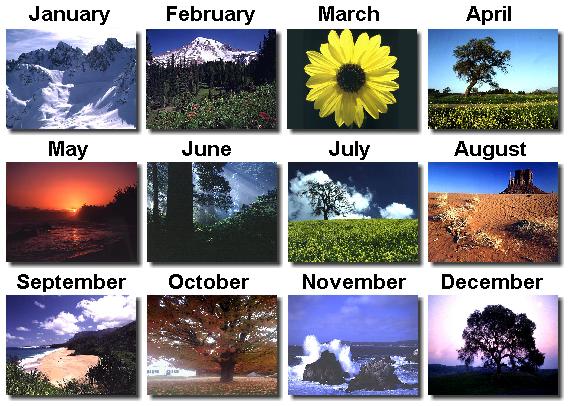
Nature 2 Image Pack
The Nature 2 Image pack which was released in 2003 consist of 12 stunning images from nature - one image for each calendar month. Image packs can be selected via the "Calendar Images ..." section of the Preferences tab.
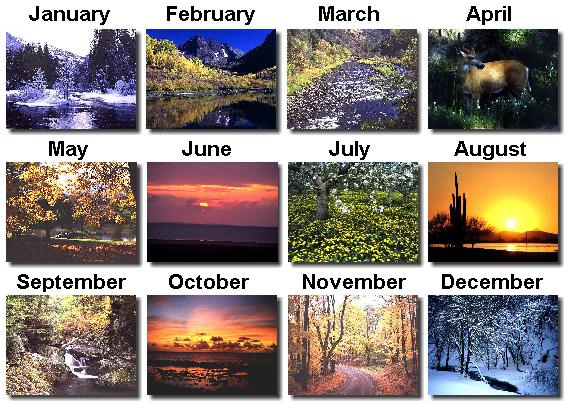
Nature 3 Image Pack
New for 2004 is the Nature 3 Image pack adding a further 12 stunning images from nature - one image for each calendar month. Image packs can be selected via the "Calendar Images ..." section of the Preferences tab.
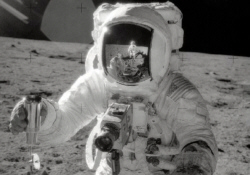
Moon Phases Background Images
Change the look of your Moon Phases tab with either of these stunning high resolution images of the Apollo Moon missions courtesy of NASA.

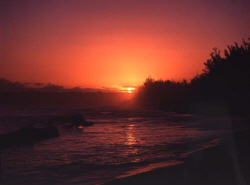
Events Background Images
Change the look of your Events tab with these calming images of nature - guaranteed to make you want to go on a vacation!

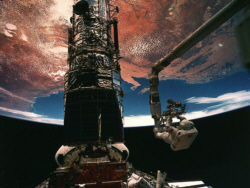
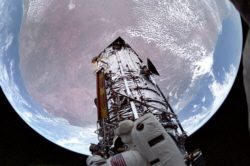
Astronomy Background Images
Change the look of your Astronomy tab with either of these stunning high resolution images from the Shuttle missions courtesy of NASA.
Click Here To Pay in UK Sterling
Click Here To Pay In US Dollars

Click here to download this page in Adode Acrobat .PDF format